Event Logging
The core job of Remote Logger is listening to either the root system logger (Python logging) or subscribe to the system_log_events raised by Home Assistant, and forwarding on as Syslog or OTLP messages. The resulting message is the same whatever mechanism is used, the main difference is the Root Logger approach allows INFO or DEBUG logs.
However, it can also be useful to listen and log many of the other events that Home Assistant emits.
Home Assistant Events
- Platform Lifecycle Events such as
homeassistant_stop - Component Lifecycle Events
- Registry Events - for new and changed devices, services, entities, users, labels, floors, areas and categories
- Service Calls
- State Changes - state value often with a slew of additional attributes
- Automation Executions - for automations, scripts and scenes
- Custom Component events - like
autoarm_change
Selecting Events in Remote Logger
The screen below is shown as a second config page once you submit the main configure logging hub configuration.
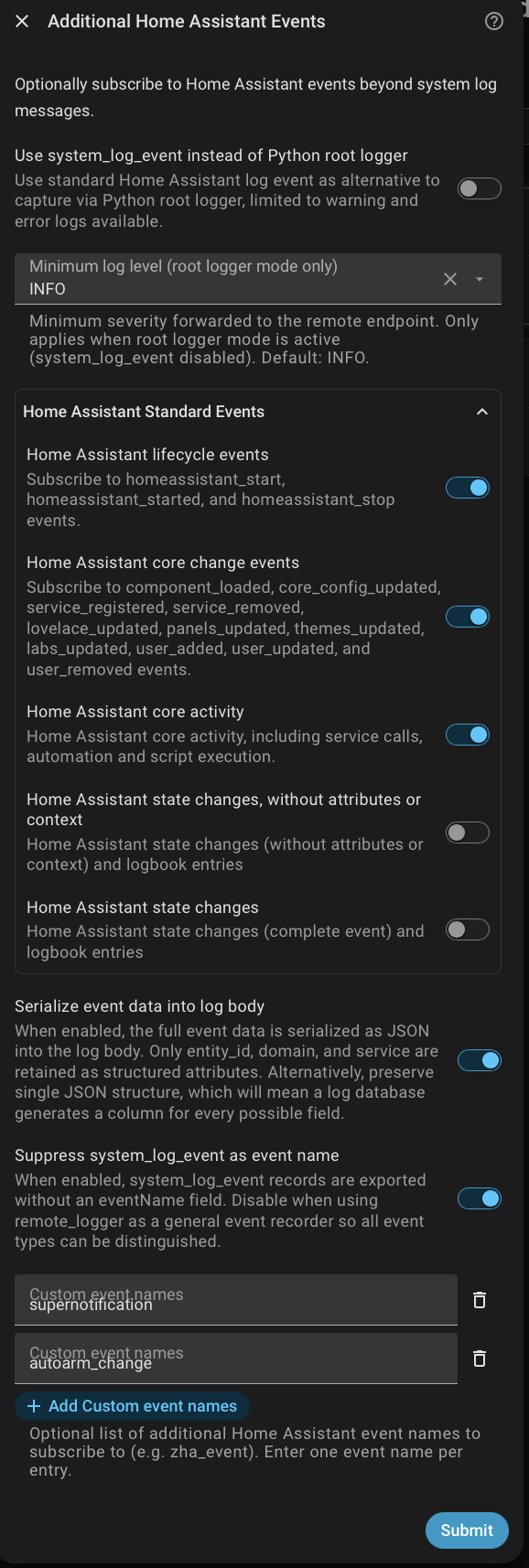
The free-form event box can be used as an alternative to pick specific Home Assistant events, or any other custom component events. Its easy to log whole categories of these from the Remote Logger configuration, or select individual ones you need. State changes can be huge in volume, and can also stress log aggregators by creating huge numbers of columns, so Remote Logger offers two versions of state logging - the bare state, or the full version with attributes ( and also a choice in how events are sent over JSON, as simplified messages, or full raw native ones with all the fields).
| Bundle | Description |
|---|---|
| Lifecycle | Home Assistant server start and stop events |
| Core Changes | Components and services loading or unloading, config reapplied |
| Core Activity | Actions, mobile actions, scripts, automations executed |
| State Changes | Entity state changes and log book entries, with states stripped of attributes and context to avoid huge log entries |
| Full State Changes | Entity state changes and log book entries, full and untrimmed |
State Changes and Full State Changes are mutually exclusive - only one may be enabled at a time, since the full version is a superset of the bare one. Enabling both together is rejected with a validation error, and the form will show your other inputs unchanged so you can correct it.
Beyond Home Assistant
Debugging issues is much easier with full context, not only from Home Assistant itself, also add-on Apps running in HAOS, and other services on the network. For example, include logging from Frigate via a Docker syslog or OTLP collector, or network issues from a Unifi or OPNSense installation.
OpenObserve, GreptimeDB and similar tools (there's a big list of OTEL vendors and projects) can also pull in metrics and traces, for a fuller picture, though its also easy to get overwhelmed - CPU, storage, mentally - by the sheer scale of what could be aggregated, even in a home lab.
See the examples for working configuration.